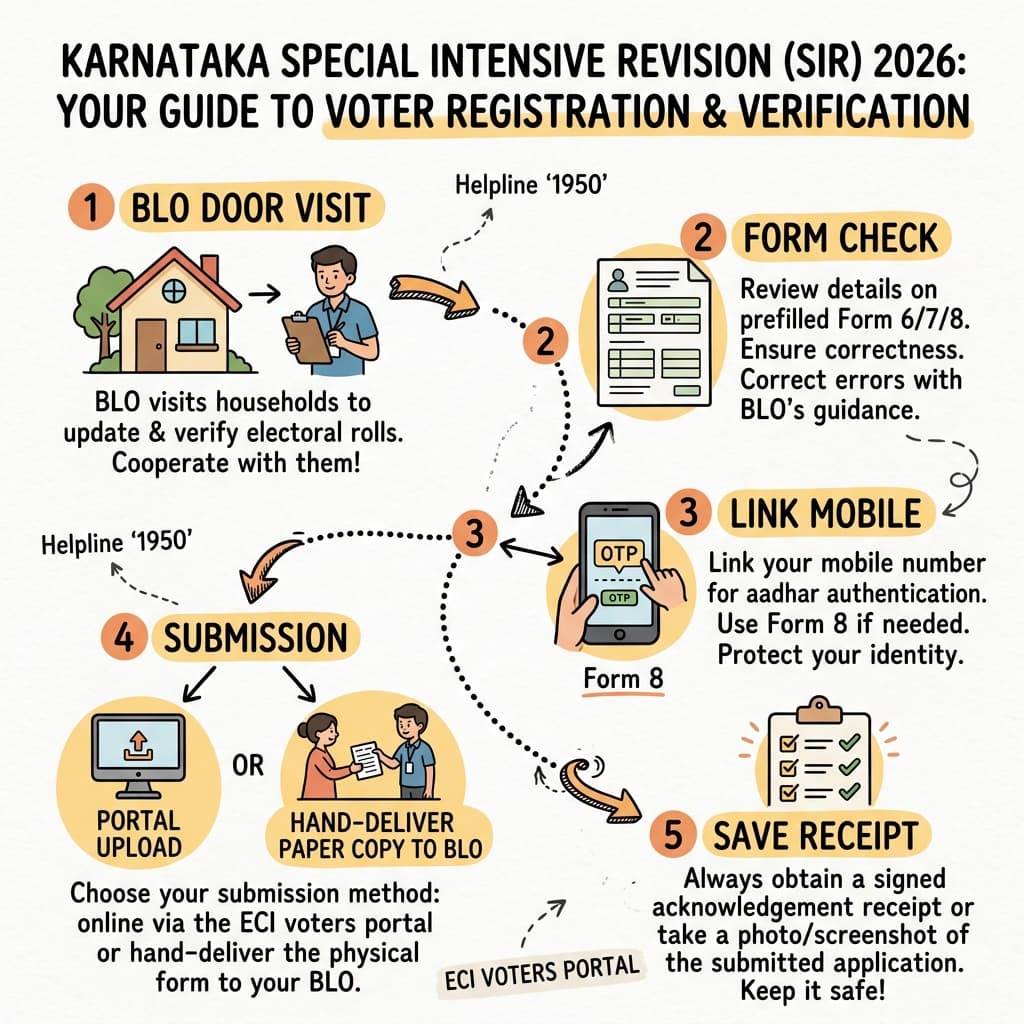
Step 1
Start from official SIR route
Open the official Voters Services Portal. Select Karnataka and go to the SIR/enumeration flow.
Use official domain
Do not use forwarded links
Check page title before entering EPIC
Independent public SIR guide
An independent, practical guide for Karnataka voters, including Bengaluru. Learn what to keep ready, what each portal screen means, when to use Form 8, when to ask your BLO, and how to save your acknowledgement safely. Other states may follow different notices and schedules.
This website, its SIR information, checklists and AI assistant are free. Charges apply only if you request dedicated human guidance and expert time for form-filling assistance. You remain responsible for every entry and submission.
NammaGuide explains the process. ECI, CEO Karnataka, BLO, ERO and DEO decide the official status.
Professional guidance—not an official service: NammaGuide is not authorised by ECI to collect voter information, does not submit forms for the public, and does not act as a legal advisor or election officer. Users remain responsible for every entry and submission on official portals.
Interactive SIR process map
Choose online or offline/BLO path. Tap a node to read the citizen action.
Visual flow guidelines
Start with the overall workflow, then switch to the mobile-linking and historical record guides when you need more context.
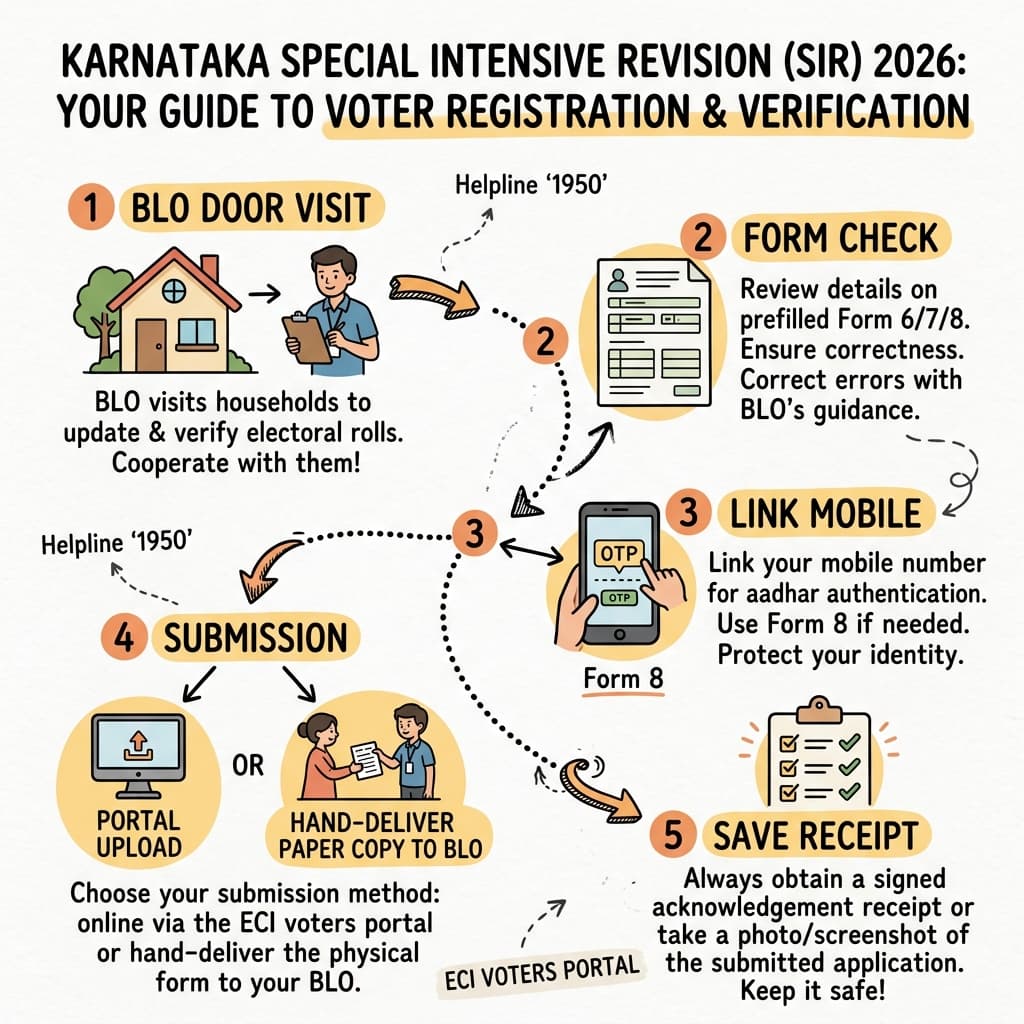
Practical help that makes a complicated official process easier to understand and complete independently.
“Being a real estate company business owner I have interacted with my clients who face difficulties understanding govt portals. NammaGuide has explained the SIR process and various other real estate related govt documentations in very simple way. Hats off Manoj you have really solved a complex issue.”

Amit Banerjee
Owner, Ascat Properties
“Nammaguide was very helpful for me to fill up the online SIR form. The guidelines were given very clearly stepwise , which really saved my time and it happened smoothly without any hassle. Thanks to Manoj for taking such a good initiative. Kudos to him.”

Rituparna Ghosh
PPB Residence, Bengaluru
“NammaGuide was very helpful for me while filling up my SIR enumeration form online. It saved me the hassle of manually filling up the enumeration form and submission to BLO, which many times lead to manual data entry errors. NammaGuide’s AI assistant answered all my queries and helped me fill up my form in less than 10 minutes. Super helpful. Awesome work by the NammaGuide team!”

Sourav Das
Senior Manager @ Amazon, Bengaluru
“Between back-to-back calls and zero bandwidth to sit through government portal confusion, this is exactly what I needed. No jargon, no endless tabs trying to figure out which deadline applied to me — just a clear, step-by-step flow I could follow in one sitting. I filed my SIR enumeration form between meetings, without chasing anyone or second-guessing what I was uploading. In a world full of noisy, contradictory 'guides,' this one respected my time and gave me a straight answer. Genuinely one of the most useful 20 minutes I've spent on admin work all year.”

Soumya Ghatak
Senior Program & Product Manager @ Otis, Bengaluru
Official references
NammaGuide explains the process. ECI, CEO Karnataka, BLO, ERO and DEO decide the official status.
Last reviewed: August 13, 2026
First 5-minute checklist
Do this before you open the form. It saves time and avoids wrong entries.
Important dates
Revised schedule checked on the CEO Karnataka website on August 12, 2026. Check the official source again before acting because dates can change.
Online portal guide with masked visuals
These are public-safe demo visuals generated from the real screenshot journey. Personal data is masked or replaced.
Step 1
Open the official Voters Services Portal. Select Karnataka and go to the SIR/enumeration flow.
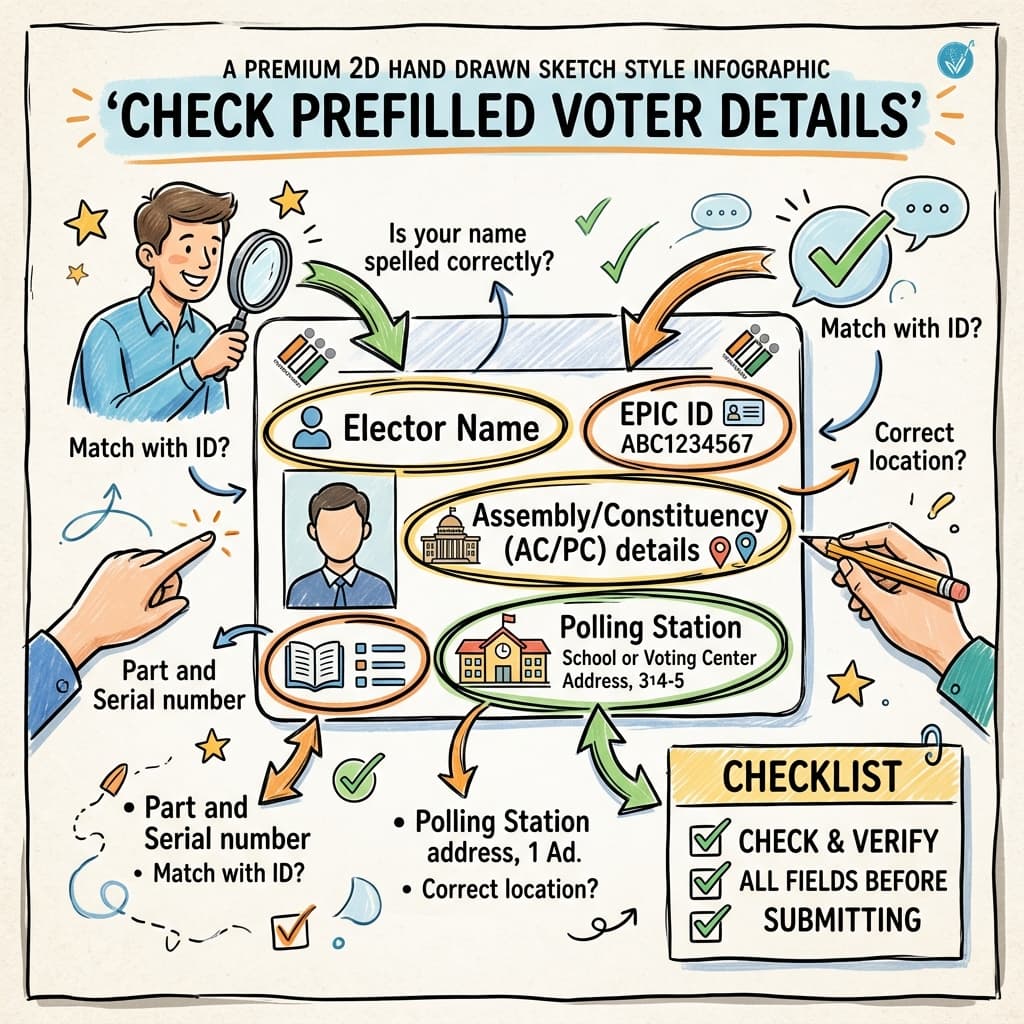
Step 2
The portal may show your voter details. Compare every field before moving ahead.
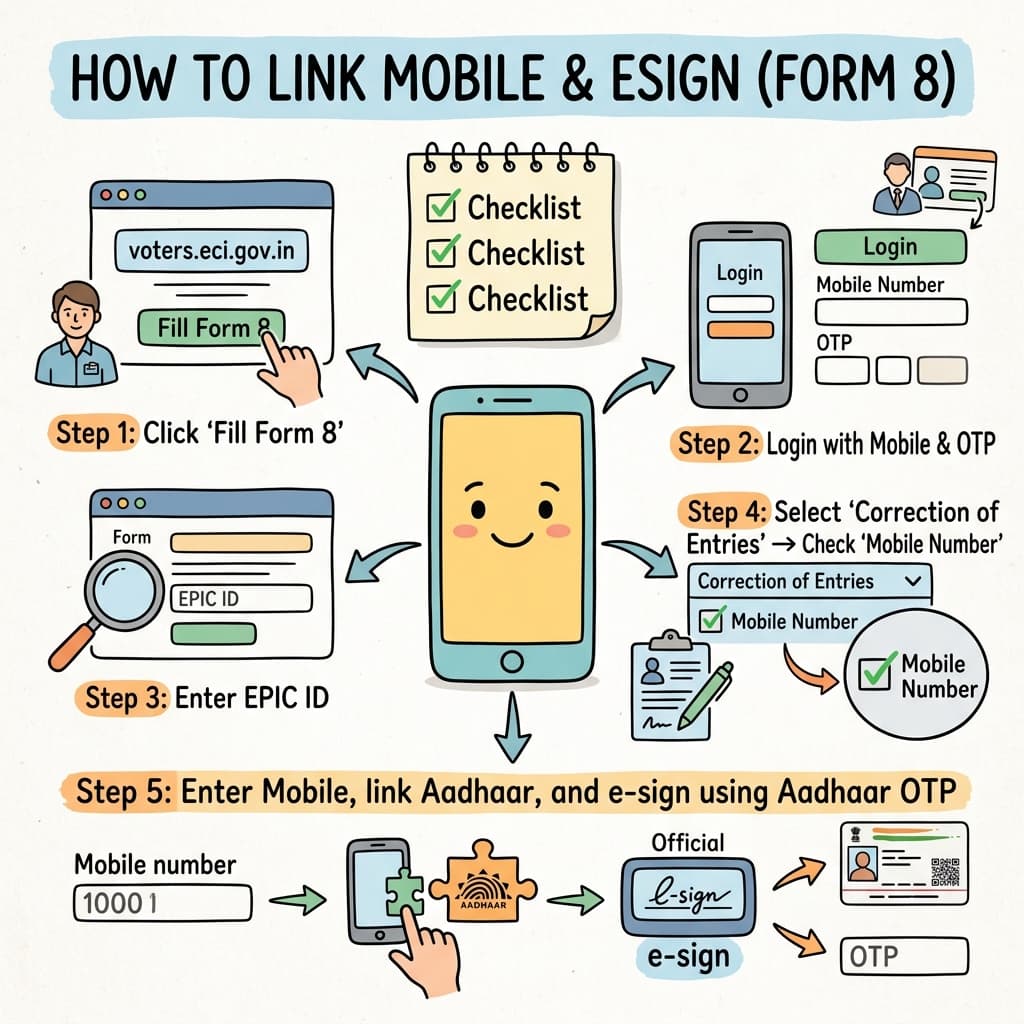
Step 3
Online OTP may fail if your mobile is not linked. Use Form 8 or ask BLO about offline completion.
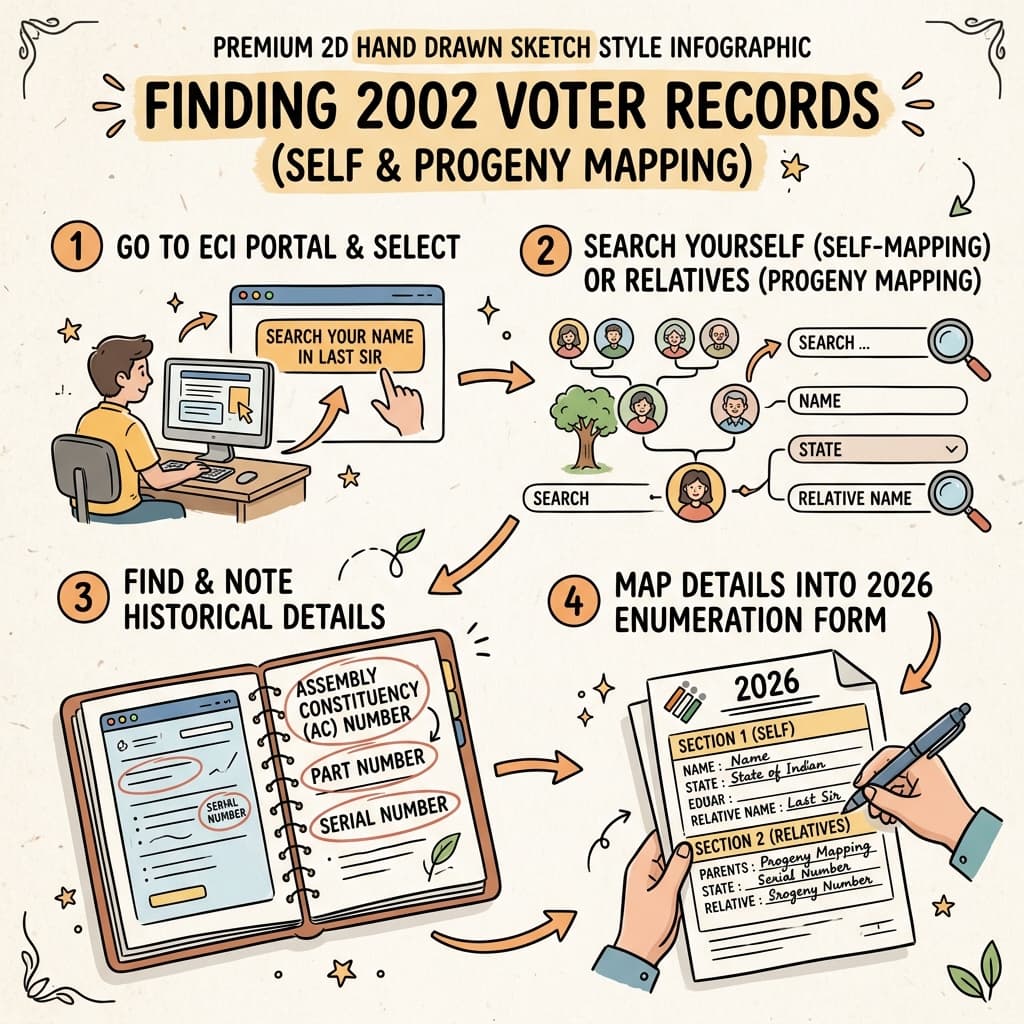
Step 4
Try self-mapping first. If not found, search parent, grandparent, spouse or guardian details.
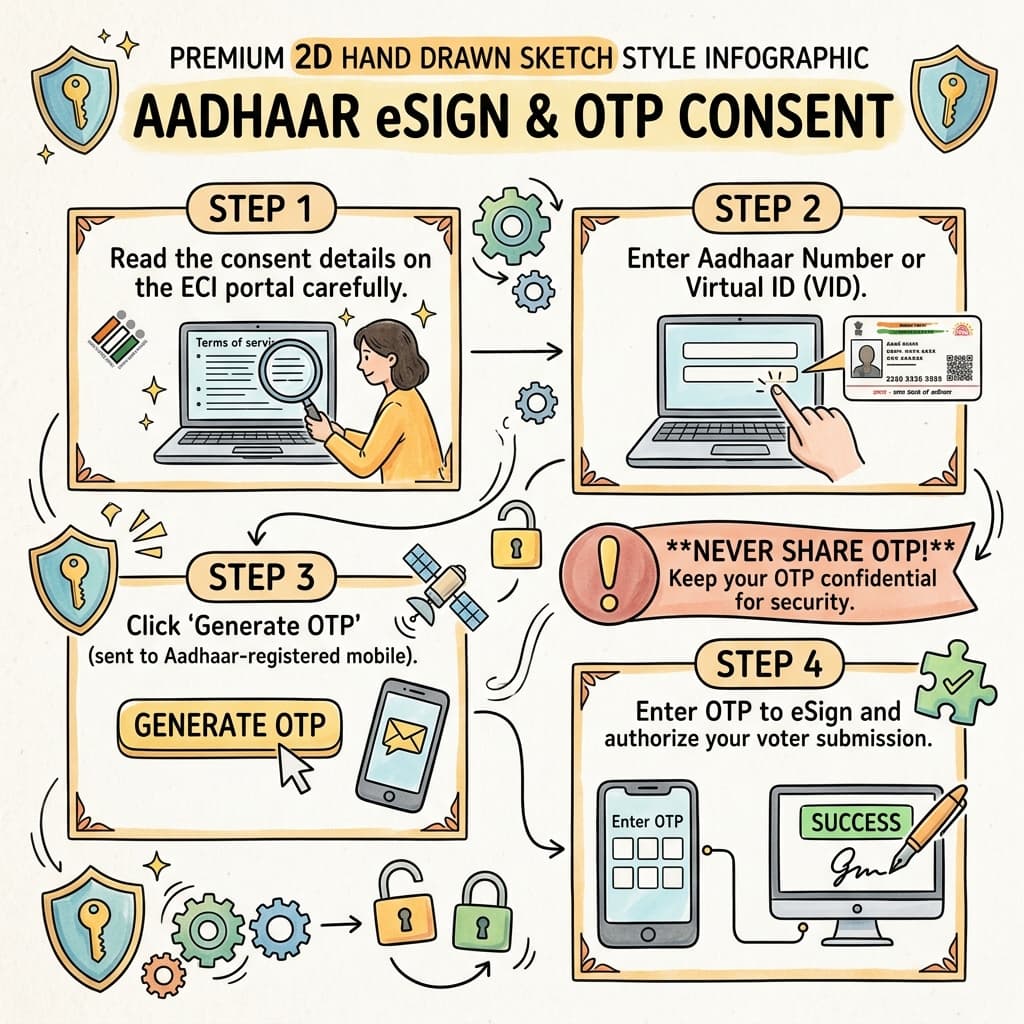
Step 5
Aadhaar/VID/UID token screens should be used only for your own submission. Read consent carefully.
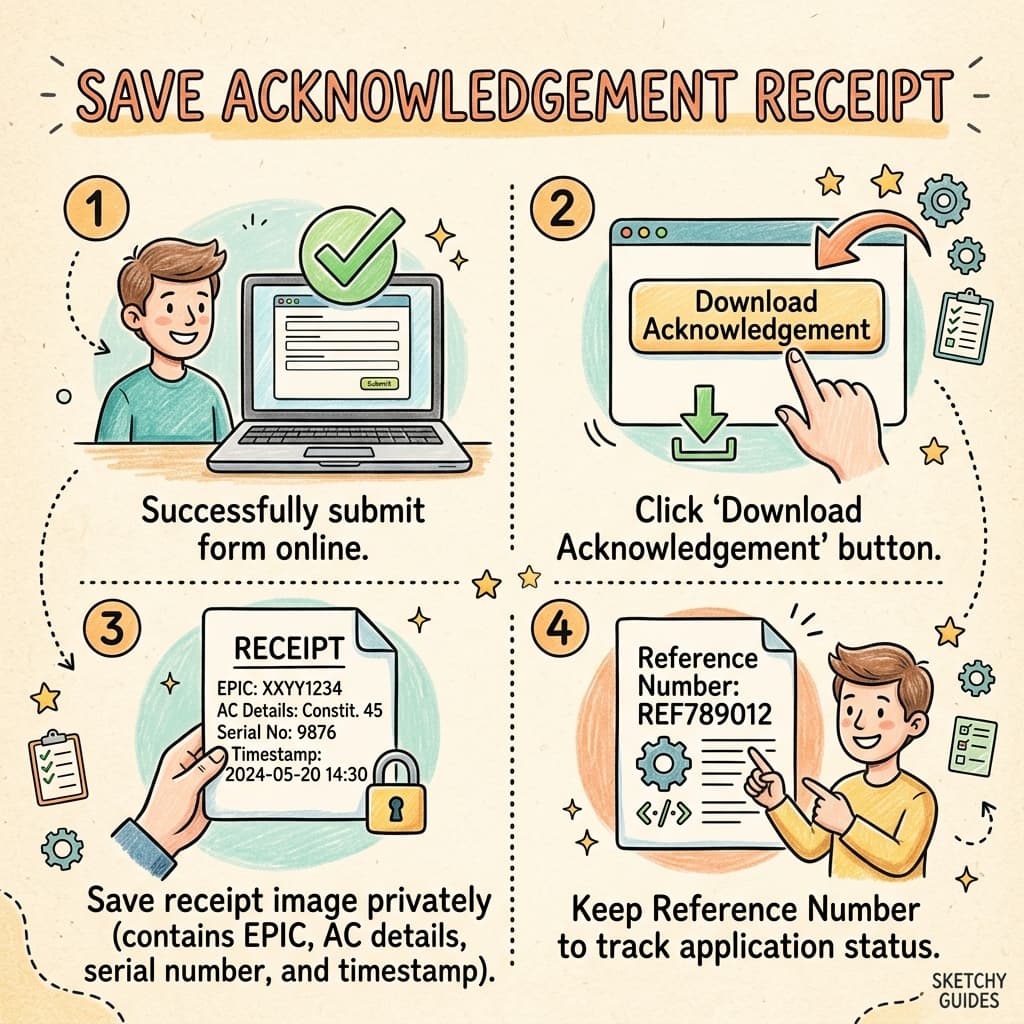
Step 6
After submission, save the receipt privately. It may contain EPIC, part, serial and timestamp.
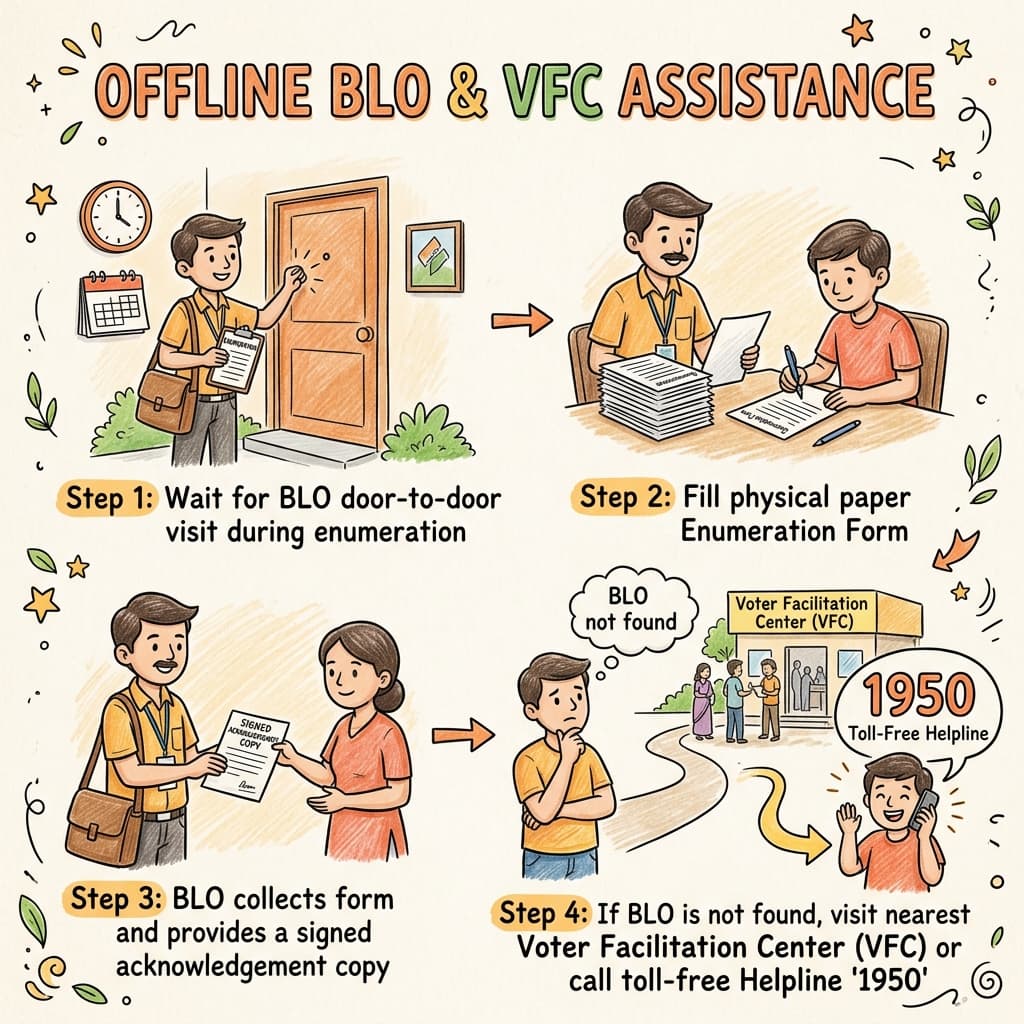
Step 7
If online does not work, use BLO or official Voter Facilitation Centre guidance.
Karnataka scale
Reported public numbers help show the size of the exercise. Check latest official updates.
5,54,32,314
59,050
31
224
336
7,556
1,15,112
News points rewritten simply
NammaGuide explains the process. ECI, CEO Karnataka, BLO, ERO and DEO decide the official status.
Reports the Karnataka SIR timeline, Voter Facilitation Centres, official repository, statewide election-staff numbers, and colour-coded BLO visit stickers.
Citizen Matters - July 3, 2026; updated July 7, 2026Explains self-mapping, progeny mapping, mobile linking through Form 8, online form steps, BLO lookup, previous SIR search, and practical citizen difficulties.
Common questions
Short answers for normal voter problems.
No. NammaGuide is independent. Verify final instructions on ECI/CEO Karnataka or with BLO/ERO.
No. This page and chatbot are educational only. Do not share personal voter data here; use official portals or official BLO/ERO channels.
Use Form 8 for linking/correction or ask BLO about offline submission.
Search self first, then parent, grandparent, spouse or guardian. Do not invent data.
Portal screenshots show Aadhaar eSign options, but you should read official instructions and consent carefully.
Citizen explainers say an adult family member may help in some cases. Verify with official portal or BLO.
Use official polling official lookup or contact local election office/VFC guidance.
No. This is not a paid or assisted filing service. Use this page to understand steps, then submit yourself on official portals or through BLO/ERO.
OTP, Aadhaar, full EPIC, phone number, address, unmasked receipt, and private family details.
Use the official correction route or BLO/ERO guidance. Do not force wrong details.
Keep acknowledgement private and use official status/portal or election office guidance.
Call ECI toll-free national voter helpline 1950 from any phone for any registration, deletion, or verification assistance. You can also use the official ECI Voter Helpline App.
Standard ECI forms apply: Form 6 is for registering as a new voter. Form 7 is for requesting deletions or filing objections. Form 8 is for corrections, shifting of residence, or mobile number linking.
This page cannot approve forms, contact officials, guarantee inclusion, provide legal advice, or handle private OTP/Aadhaar details.
NammaGuide is not authorised by ECI to collect voter information, does not submit forms for the public, and does not act as a legal advisor or election officer. Users remain responsible for every entry and submission on official portals.
Do not share OTP, Aadhaar, full EPIC, or unmasked receipt