Voter Services
Karnataka SIR Draft Voter List 2026: Search Your Name
Karnataka's SIR draft electoral roll was published on 24 August 2026. Follow the ECI download steps, search your name, and know what to do if it is missing.
24 August update: the Karnataka draft roll is available
The Karnataka SIR 2026 draft electoral roll was published on 24 August 2026. The current Chief Electoral Officer Karnataka home page now links Draft Electoral Roll – (SIR-2026) to ECI's electoral-roll download page.
If you live in Bengaluru or elsewhere in Karnataka, use that official page to download the draft for your Assembly Constituency and polling Part. Then check the entry itself—submitting an Enumeration Form or holding an EPIC card does not replace checking the roll.
Draft published 24 August 2026
Check your name while the claims and objections window is open.
The revised Karnataka window runs through 23 September 2026. A name found in the draft is reassuring, but it is not a guarantee that the final roll will remain unchanged.
Open the official ECI draft-roll pageThese are statewide Karnataka dates, so they apply to Bengaluru Urban and BBMP/GBA areas as well. The current CEO Karnataka draft-roll link and ECI search interfaces were reviewed on 26 August 2026.
Official revised calendar
Karnataka SIR 2026 at a glance
BLO house visits
30 Jun – 17 Aug
Draft publication
24 Aug 2026
Claims & objections
24 Aug – 23 Sep
Final publication
27 Oct 2026
Karnataka SIR 2026 revised schedule
The latest schedule replaces the earlier Karnataka dates shown in July. The most important changes for voters are:
BLO visits end
8 August
17 August
Draft roll
17 August
24 August
Claims close
16 September
23 September
Notice/disposal ends
17 October
22 October
Final roll
19 October
27 October 2026
Visual decision guide: draft roll verification workflow
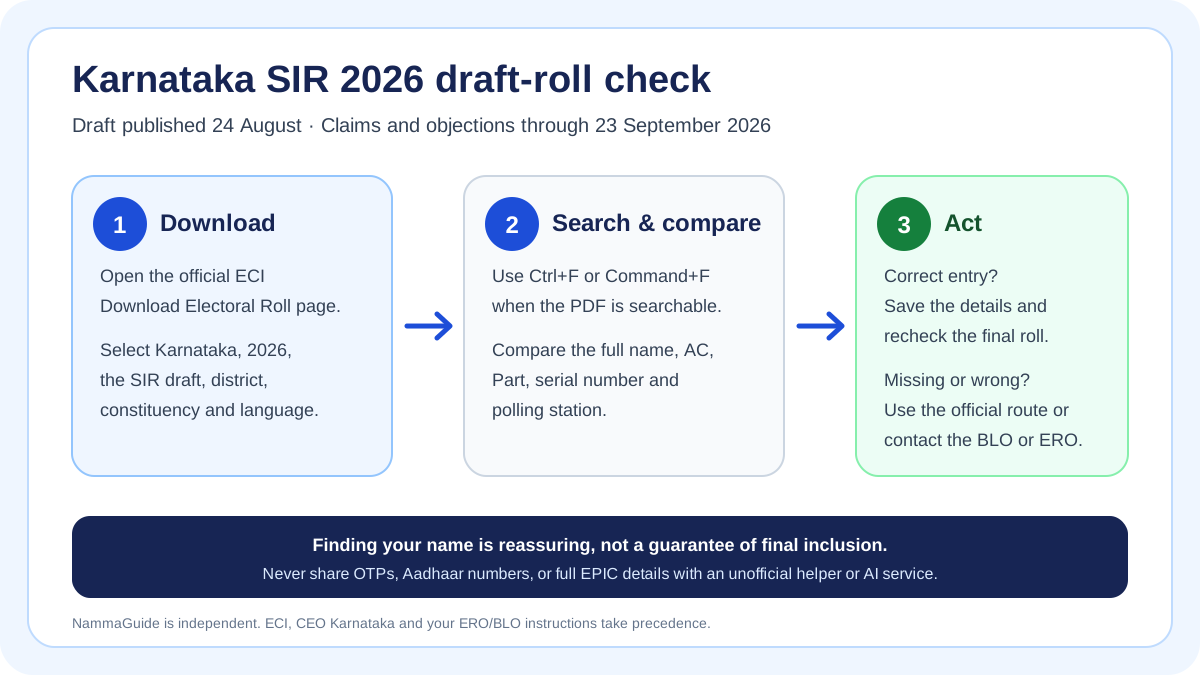
NammaGuide visual summary. The official portal, ECI forms and instructions from the BLO or ERO control the actual process.
Important: the BLO house-visit period has ended.
Use the published draft and the current claims and objections window now; do not wait for the final roll to discover a missing or incorrect entry. Portal availability, constituency-level instructions and an individual voter’s status can differ.
Why this update matters especially in Bengaluru
CEO Karnataka's daily press release dated 7 August 2026 at 4:00 PM recorded a statewide SIR exercise covering 5,54,32,314 electors. It reported 5,54,32,132 Enumeration Forms digitised or marked in ASDDO categories, with 182 pending digitisation at that snapshot.
The same release showed a much higher ASDDO share in several Bengaluru reporting rows than the statewide figure of 19.81%:
Bangalore Urban
44.13%
40,21,039 electors · 22,46,413 EF digitised · 17,74,626 marked ASDDO
BBMP North
46.46%
23,32,621 electors · 12,48,874 EF digitised · 10,83,747 marked ASDDO
BBMP Central
47.29%
18,89,919 electors · 9,96,188 EF digitised · 8,93,731 marked ASDDO
BBMP South
50.72%
21,44,784 electors · 10,56,956 EF digitised · 10,87,829 marked ASDDO
These are separate rows exactly as published; they should not be added together without official clarification about the reporting structure. They are also a dated operational snapshot, not the final electoral roll.
In the press release, ASDDO covers electors marked under categories such as absent or untraceable, shifted, deceased, already enrolled and other cases. An ASDDO marking is a prompt to verify the record through official channels—it is not, by itself, this article declaring that a person has been deleted.
What Bengaluru voters should do during the draft period
- Search the published draft through the official Voters' Services Portal and follow the download steps below.
- Check the full entry, including the Assembly Constituency, Part, serial number and polling-station details.
- If you submitted an Enumeration Form, keep the acknowledgement private, but do not treat it as proof that the draft entry is correct.
- If your record appears in the official Karnataka ASDDO list, contact your BLO or ERO and follow the official verification route.
- If you are eligible but not enrolled, use Form 6 with the applicable declaration and supporting documents. The 7 August release specifically referred to people who attain age 18 by 1 October 2026.
- Use Form 8 for applicable corrections or shifting, and Form 7 only for the prescribed deletion or objection process.
Do not share OTPs, Aadhaar numbers, full EPIC details or unmasked acknowledgements with an unofficial agent. NammaGuide is an independent educational guide and does not collect voter records.
How to download the Karnataka SIR 2026 draft roll
- Open ECI's base Electoral Roll download page. Check that the address ends in
eci.gov.inbefore entering anything. If a Karnataka-prefilled link containing?stateCode=S10shows a blank white page, return to this base link and select Karnataka manually. - Select Karnataka as the State.
- Choose 2026 as the Year of Revision.
- Select SIR DraftRoll - 2026 as the Roll Type. Portal wording can change; choose the current official SIR draft option rather than a 2025 roll or a final roll from another revision.
- Select your district, Assembly Constituency and preferred available language. Bengaluru districts may appear under labels such as B.B.M.P. North, Central or South.
- Complete the captcha yourself. NammaGuide cannot complete or bypass it.
- Use the list below the filters to identify the applicable polling Part. Select the Part PDF, or use the full-Assembly-Constituency draft download when the portal offers it.
- Save the file privately. Electoral-roll PDFs contain other voters' details, so do not repost the file or send it to an unofficial helper.
If you do not know your district, Assembly Constituency or Part, first use the official electoral search described below. Do not guess from a pincode or an old address.
How to find your name inside the downloaded PDF
- Open the downloaded PDF locally in Chrome, Edge, Preview or a trusted PDF reader.
- Press Ctrl + F on Windows or Command + F on a Mac.
- Search the name using the spelling and script used in the roll. If needed, try the relative's name or a known spelling variant.
- Check the full entry—not just the name. Compare the relative's name, age or date-of-birth information shown, Assembly Constituency, Part, serial number and polling-station details.
- Record the Part and serial number for your own use, but do not publish an unmasked screenshot of the entry.
Some PDFs may not have a usable text layer, and browser Find may miss a name even when it is visible on the page. In that case, inspect the relevant Part manually or use ECI's Electoral Search. Do not upload the electoral-roll PDF to Gemini or another AI service for name-finding: the file contains personal information about many voters. Chrome's ordinary Find command is the safer quick-search option.
Alternative: search by EPIC, details or registered mobile
Open the stable ECI Electoral Search home page instead of bookmarking a long, changeable path. The current official interface provides three routes:
- Search by EPIC: enter the EPIC number and State shown on your voter record.
- Search by details: use the available name, relative, age/date-of-birth, gender, district or constituency fields.
- Search by mobile: use a mobile number already registered with the voter record and complete the OTP step only on the ECI site.
Never tell an AI assistant, private agent or NammaGuide chatbot your OTP, full EPIC number, mobile number or unmasked voter entry. If the search finds a record, compare its constituency, Part, serial number and polling-station details with the draft PDF.
Finding the record is a positive checkpoint, not a “safe zone” guarantee. The draft remains subject to claims, objections, notices and disposal. If the PDF and search portal disagree, save non-sensitive notes about the mismatch and contact the BLO or ERO, or call ECI's voter helpline at 1950.
If your name is missing or a detail is wrong
- Use the official form that matches the problem during the 24 August to 23 September 2026 claims and objections window. ECI generally uses Form 6 for inclusion and Form 8 for applicable corrections or shifting; read the current form description before submitting.
- Use Form 7 only for the prescribed objection or deletion route. Do not use it to correct your own spelling or address.
- Save the official acknowledgement or reference number privately and track it on the ECI portal.
- Do not assume a submitted form has been accepted. Recheck after the revised final publication date of 27 October 2026, and check the current electoral roll again before an election.
The notice, hearing, verification and disposal process can continue until 22 October 2026. Only the ERO and election authorities decide inclusion, correction or deletion.
Official links and source notes
- CEO Karnataka home page and latest notices
- ECI electoral-roll download page
- ECI Electoral Search
- ECI voter forms dashboard
- Official revised Karnataka SIR 2026 schedule image
- CEO Karnataka ASDDO list
- ECI Voters' Services Portal
- ECI/CEO voter helplines shown by CEO Karnataka: 1950 and 1800 4255 1950

Draft-roll update: the CEO Karnataka home page was reviewed on 26 August 2026 and linked Draft Electoral Roll – (SIR-2026) to ECI's Karnataka download page. The portal fields in the steps above were compared with the ECI page and the 24 August interface supplied by the reader. The screenshot was supporting context only; ECI and CEO Karnataka remain the controlling sources.
Schedule source: CEO Karnataka revised SIR 2026 banner displayed on 12 August and rechecked on 13 August 2026. The home page then linked the ASDDO List as on 11 August 2026. Data source: Office of the Chief Electoral Officer Karnataka daily press release, No. DPAR 172 ChuMaPa 2026, dated 7 August 2026 at 4:00 PM. Statistics may change after publication; always use the latest official notice for action.
For the full step-by-step workflow, open the Karnataka SIR 2026 guide and assistant. The assistant is educational only; do not enter personal voter data.
NammaGuide is independent of the Election Commission of India and CEO Karnataka. Original schedule research was checked 13 August 2026 by Manoj Mukherjee; draft-roll links and search steps were reviewed 26 August 2026 under NammaGuide's editorial and corrections policy. Recheck after every CEO Karnataka schedule, draft/final-roll or press-release update.
Use the official route
Official links for your next step
Use the government or utility portal for the live form, required fields, current status, and final decision. NammaGuide helps you prepare and choose a route; it does not replace the authority.
Last reviewed: August 13, 2026
FAQ
What is the revised last date for Karnataka SIR 2026 BLO house visits?
CEO Karnataka's revised schedule shows house-to-house visits by BLOs from June 30 through August 17, 2026. The date applies across Karnataka, including Bengaluru.
When will the Karnataka SIR 2026 draft voter list be published?
The Karnataka SIR 2026 draft electoral roll was published on August 24, 2026. CEO Karnataka now links voters to the ECI electoral-roll download page to check the draft.
How do I download the Karnataka SIR 2026 draft voter list?
Open ECI's electoral-roll download page, select Karnataka, revision year 2026, the SIR DraftRoll option, your district, Assembly Constituency and language, complete the captcha, and download the applicable Part PDF or full-constituency file when offered.
Can I search the Karnataka voter list by EPIC or mobile number?
Yes. ECI's separate Electoral Search portal currently provides search by EPIC, personal details, or a registered mobile number. Mobile search uses an OTP; enter it only on the official ECI page and never share it with a helper.
Does finding my name in the draft roll guarantee that I am on the final voter list?
No. A draft-roll match is a useful positive check, but the claims, objections and disposal process is still open. Check the final electoral roll after publication and recheck your current record before an election.
What is the claims and objections period in Karnataka?
The revised claims and objections window is August 24 to September 23, 2026. The notice and disposal phase runs from August 24 to October 22, 2026.
When is the final Karnataka electoral roll due?
CEO Karnataka's revised schedule lists October 27, 2026 for final publication. Check the official website again in case a later order changes the date.
Do the revised Karnataka dates apply to Bengaluru and BBMP areas?
Yes. The displayed schedule is statewide, so it covers Bengaluru Urban and BBMP or GBA areas. Constituency-level instructions should still be confirmed with the relevant BLO or ERO.
Need instant SIR help?
Our AI Assistant is trained on all 2026 guidelines, forms, and timelines. Get instant, personalized answers right now.
Full SIR 2026 Guide
Browse our comprehensive, step-by-step master guide covering every single aspect of the Pan-India revision process.